Analysis of a Low-Detection Linux Implant with Hands-On Intrusion Capabilities
UPDATE: After reviewing related infra found by @500mk500 and a related sample by @malwrhunterteam, I found quite a few similarities with the Adaptix Agent using the adaptix_gopher protocol.
In early July 2026, MalwareHunterTeam shared an interesting ELF named gregbfdah.png with minimal detection in VirusTotal. The ELF was uploaded to VirusTotal on 2026-06-16 and it still has very low detection. The file was delivered from the following AWS domain: https://zapier-logos.s3.amazonaws[.]com/gregbfdah.png. That URL was first submitted to VirusTotal from India on 2026-06-11.
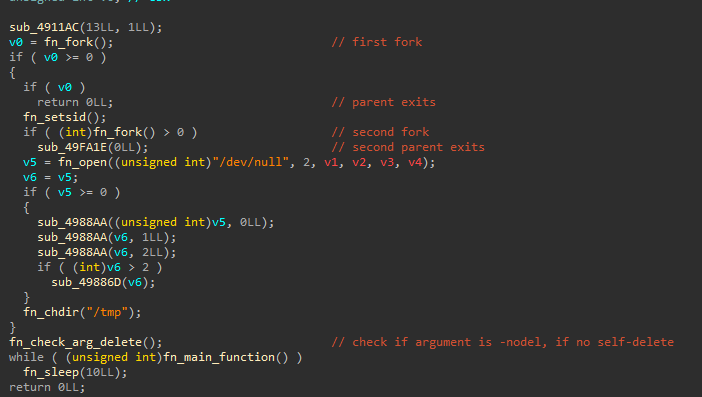
The file in question is a statically-linked x86-64 Linux ELF backdoor/C2 implant written in C++, possibly still in development. When executed, the backdoor:
- Implements a classic double fork for daemonization.
- Redirects its standard streams to
/dev/null. - Changes directories to
/tmp. - Checks if it was executed with the
-nodelargument. If it was, it executes the main backdoor logic. If not, it self-deletes.
Configuration Decryption
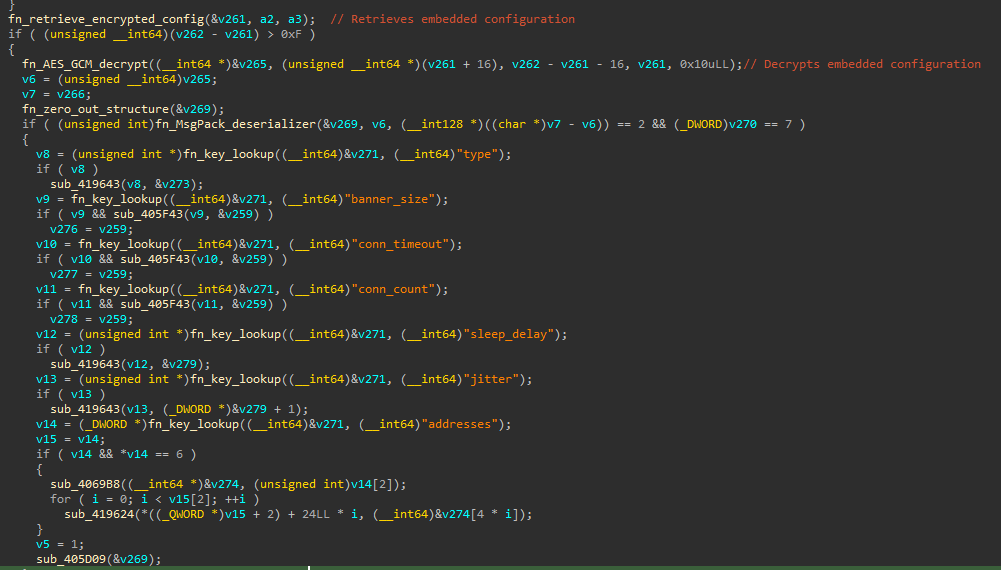
The implant uses the MessagePack binary serialization format for its configuration and C2 communication. The main function of the malware starts by retrieving, decrypting, and parsing its configuration.
The following attributes are parsed from the configuration:
typebanner_sizeconn_timeoutconn_countsleep_delayjitteraddresses
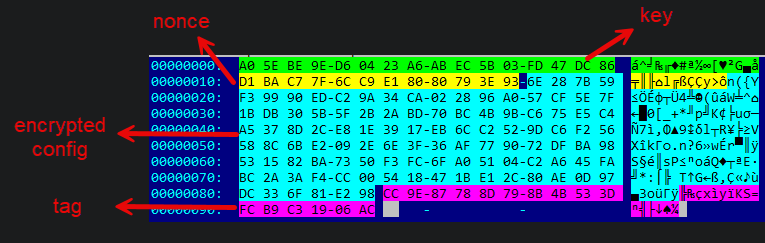
The configuration is embedded in the .data section and is encrypted with AES-128 in GCM mode. The blob with the encrypted configuration has the following structure:
- The first 16 bytes are the key.
- The next 12 bytes are the nonce.
- Bytes 28 until the tag is the encrypted configuration.
- The last 16 bytes are the tag.
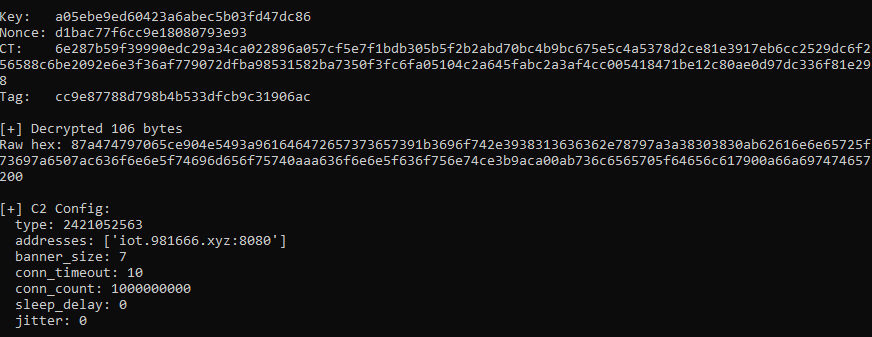
The following script can be used to decrypt and parse the configuration once the embedded blob has been extracted:
1
2
3
4
5
6
7
8
9
10
11
12
13
14
15
16
17
18
19
20
21
22
23
24
25
26
27
from cryptography.hazmat.primitives.ciphers.aead import AESGCM
import msgpack

with open("extracted_blob.bin", "rb") as f:
    raw = f.read()

blob = raw[:150]
key = blob[:16]
nonce = blob[16:28]
encrypted_config = blob[28:-16]
tag = blob[-16:]

print(f"Key:   {key.hex()}")
print(f"Nonce: {nonce.hex()}")
print(f"CT:    {encrypted_config.hex()}")
print(f"Tag:   {tag.hex()}")

aesgcm = AESGCM(key)
plaintext = aesgcm.decrypt(nonce, encrypted_config + tag, None)

print(f"\n[+] Decrypted {len(plaintext)} bytes")
print(f"Raw hex: {plaintext.hex()}")

config = msgpack.unpackb(plaintext, raw=False)
print("\n[+] C2 Config:")
for k, v in config.items():
    print(f"  {k}: {v}")
Decrypted and parsed configuration for this backdoor:
Next, the agent generates a per-host ID (a “fingerprint”) using SHA1. The fingerprint is comprised of the following elements:
- The
nginxstring. This does not change. - The machine id from
/etc/machine-id. If that fails, it tries with/proc/sys/kernel/random/boot_id. - The username (via the
$USERand$LOGNAMEenvironment variables). - The MAC address, enumerating interfaces under
/sys/class/net, searching for the first non-loopback interface. - The
reversestatic string. This does not change.
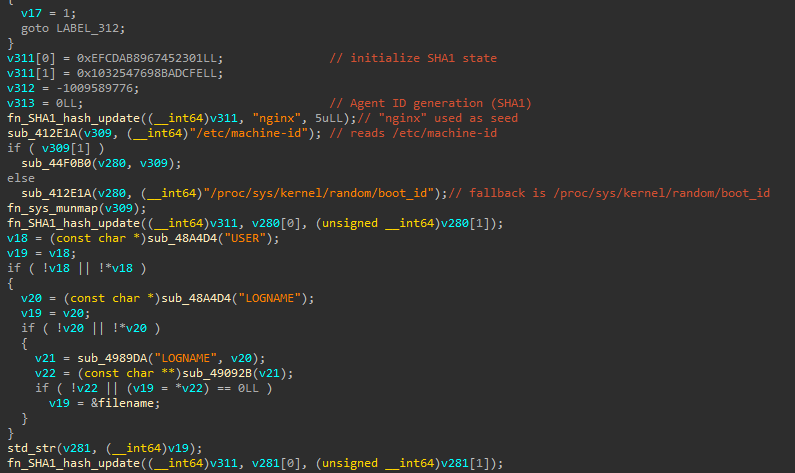
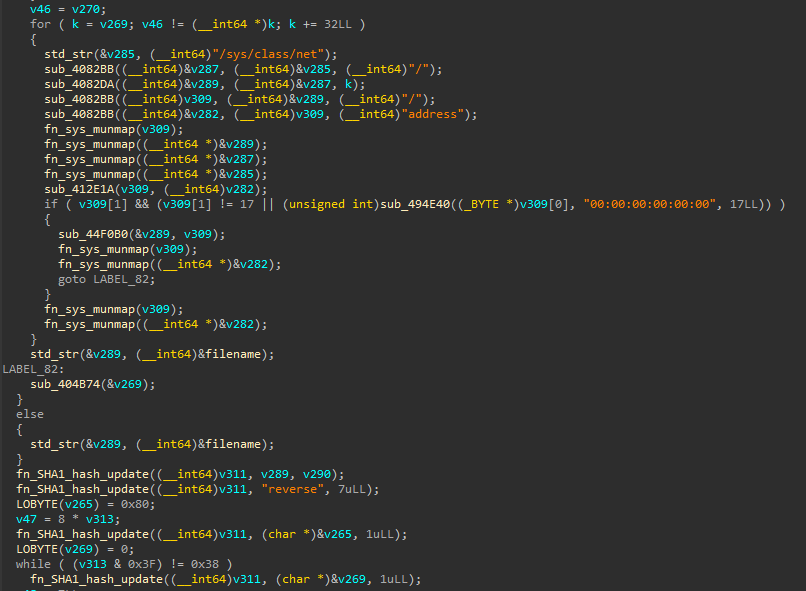
Only the first 4 bytes of the SHA1 digest are extracted as the agent ID, with _byteswap_ulong applied for endian conversion.
Key Generation and System Profiling
Next, the ‘agent’ generates a new random AES-128 session key and retrieves the key from the configuration (for further use).
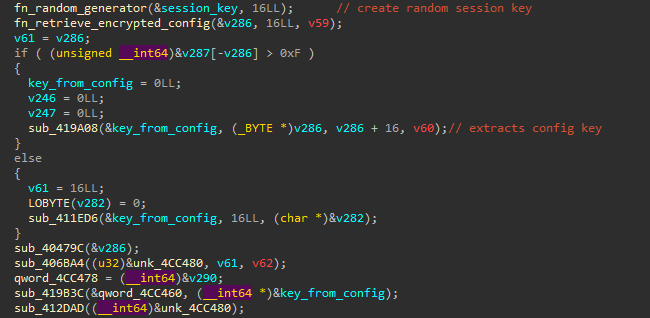
After generating the session key, the agent starts profiling the infected host. The following items are retrieved:
- The process name that the agent is running as by checking
/proc/self/exe. If it cannot be retrieved, it falls back toagent. - The PID (process ID).
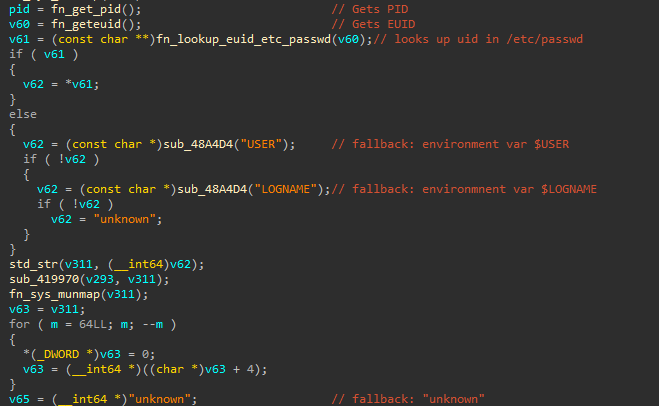
- The username by first getting the user ID and looking it up in
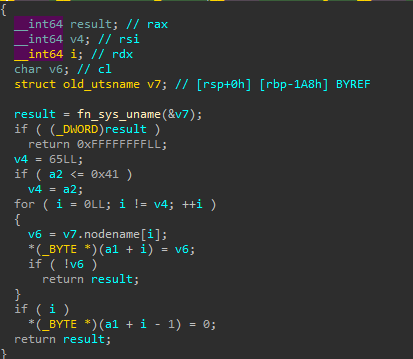
/etc/passwd. Fallbacks include the$USERenvironment variable, the$LOGNAMEenvironment variable, orunknownif everything else fails. - The hostname by retrieving the nodename via the
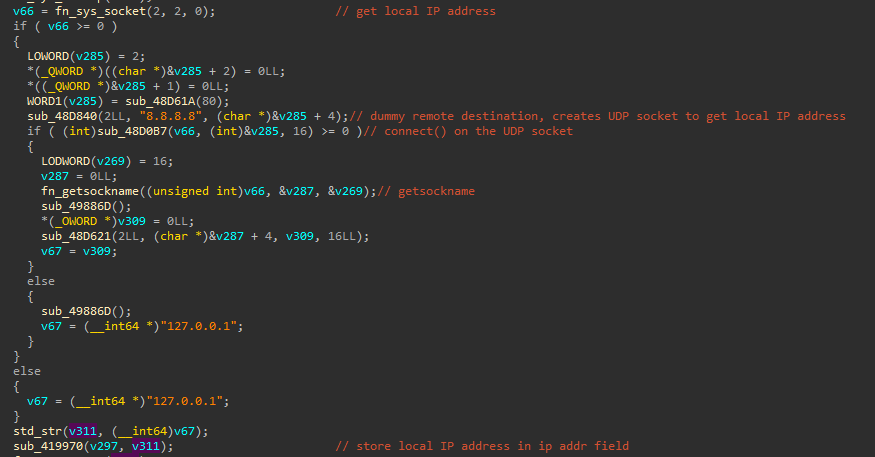
unamesyscall. - The IP address is retrieved by creating a UDP socket (using
8.8.8.8as a dummy address), calling connect to trigger a routing table lookup, and retrieving the local IP address viagetsockname. It falls back to 127.0.0.1. - Validates if it is running as root by comparing the uid to 0.
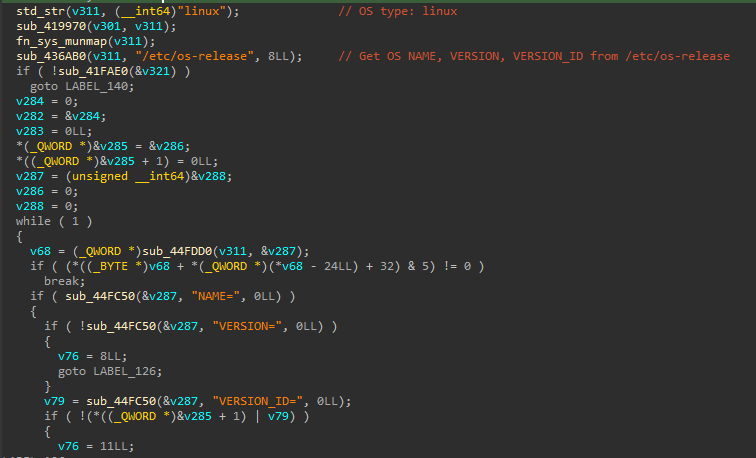
- The OS type is always set to “linux”.
- OS information by parsing
/etc/os-releaseand parsingNAME=,VERSION=, andVERSION_ID=. This check falls back to runninguname, or"Linux"if everything else fails.
Process name retrieval and fallback to agent:

Username retrieval:
Hostname retrieval:
IP retrieval:
OS type and OS information:
Beacon Registration
After profiling the system, the agent builds a beacon to register to the C2. The beacon includes a combination of configuration settings and system profiling information. The registration beacon is serialized using the MessagePack format. The registration MessagePack has an outer map and an inner map.
The inner map contains: the process name, the pid, the user, the hostname, the ip address, whether or not the implant is running as root, the os, the os version, the encryption key (the previously generated session key), the sleep delay, and the jitter. In addition to these values, which were observed before in the system profiling and configuration, additional values are sent:
- acp
- oem
- rootkit_scheme
All three are set to 0, and not modified. While I did not see a clear explanation for these fields in the implant, a hypothesis is that there may be versions of the agent that support Windows. acp could potentially refer to the GetACP function (to obtain the current ANSI Code Page), and oem could refer to GetOEMCP, associated with the OEM code page. However, this is just a hypothesis. I could not correlate these settings with anything within this specific implant.
Inner map:
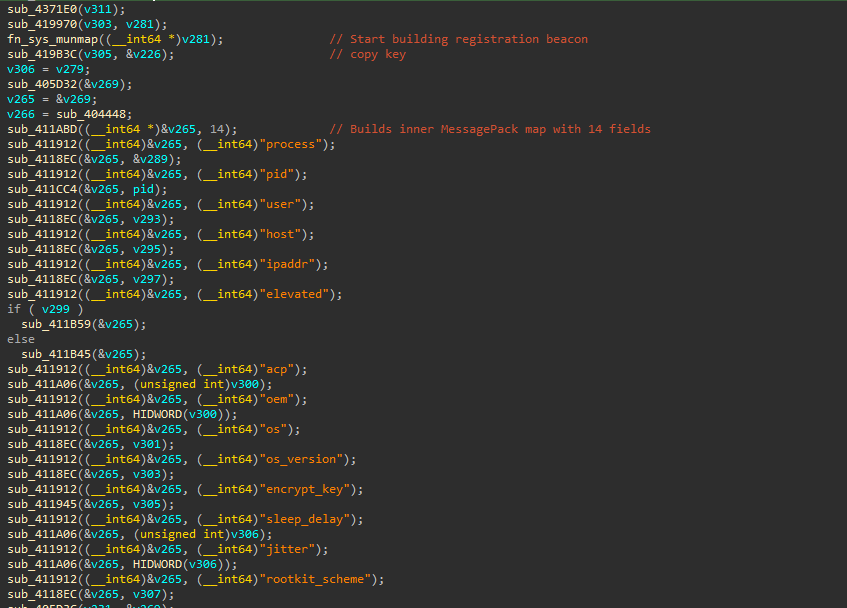
The outer map contains the ID, previously generated via the SHA1 hash, the type, from the configuration, and the data, which is the inner map data.
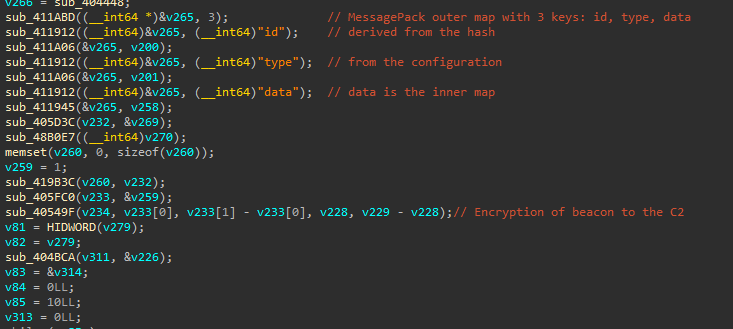
The registration beacon with the inner and outer maps is encrypted with the AES-128 key from the implant configuration (previously decrypted). This has to be known by the C2 to decrypt the registration information. This initial beacon includes the random session key.
After sending the registration beacon, the agent enters a loop to receive encrypted instructions from the C2. The commands received from the C2 are decrypted with the session key and deserialized with MessagePack unpacking. A type and an object are parsed from the response. The object is subsequently processed by a command dispatcher function.
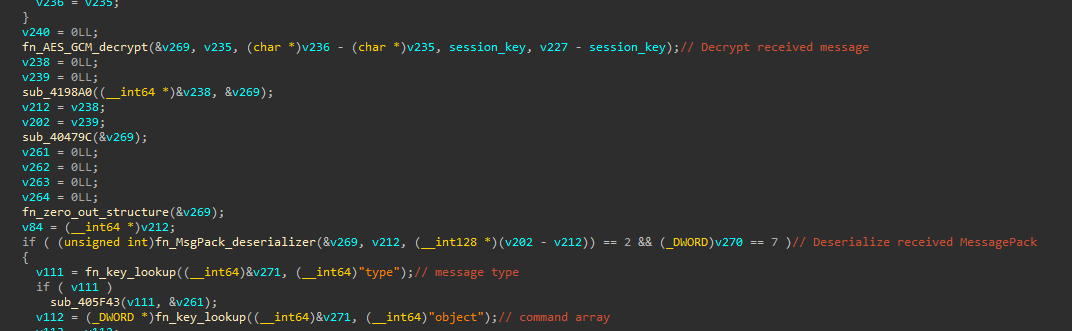
Command Dispatcher
The object received from the C2 is subsequently deserialized and code, id, and data are parsed. The code determines which command code is executed by the agent, the id can be used to correlate commands and responses, and the data is additional data that a specific command may need, like a command line.
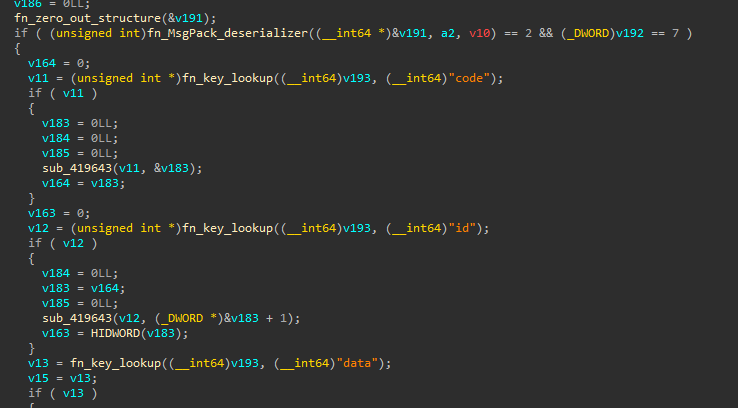
The agent supports the following commands:
| Command | Description | Comment |
|---|---|---|
| 0x1 | Gets current working directory | Uses getcwd syscall |
| 0x2 | Changes working directory | Uses chdir syscall |
| 0x3 | Executes program with arguments | Unpacks ‘program’ and ‘arguments’ |
| 0x4 | Stops/exits | |
| 0x5 | File exfiltration | Allows for exfiltration of larger files. Chunked uploads |
| 0x6 | Writes files to disk | It can unzip delivered files |
| 0x7/0x1B | Reads small files | Synchronous read of small files (<=1MB) |
| 0x8 | File copy | |
| 0x9 | File move/rename | |
| 0xA | Creates a directory | Uses mkdir syscall |
| 0xB | Deletes a file | Uses rm -rf |
| 0xC | Directory Listing | Equivalent to ls -la |
| 0xD | Process listing | Equivalent to ps aux |
| 0xE | Kills a process by PID | Uses kill system call |
| 0xF | ZIP compression | Does zip -r destination source |
| 0x10 | Screenshot | Returns “screenshot not supported” |
| 0x11 | Program Execution with a PTY | Could be used for interactive shell |
| 0x12 | Lists running jobs | Lists tasks run asynchronously |
| 0x13 | Cancels a job by ID | Uses the shutdown system call |
| 0x15 | Updates sleep and jitter | |
| 0x16 | Timestomping | Takes access time and modify time, uses utimensat syscall |
| 0x17 | Changes file permissions | Uses chmod syscall |
| 0x18 | Moves or renames a file | Takes old_path and new_path values |
| 0x19 | Creates a file | Creates a file with O_CREAT and O_WRONLY flags |
| 0x1A | File write | Writes or overwrites a file |
| 0x1F | Reverse Port forward/Pivot Tunnel | Accepts an address, protocol, and channel ID |
| 0x20 | Reverse Port forward/Pivot Tunnel Close | Closes the tunnel with a channel ID |
| 0x23 | Interactive program with PTY | Spawns program with full PTY |
| 0x24 | Kills interactive program with PTY | Uses shutdown syscall on socket and takes term_id |
| 0x25 | Sends Data Through Pivot | Bidirectional data relay into an existing 0x1F pivot tunnel |
| 0x26 | Connects to malware relay (a peer) | Potentially used to connect to 0x2D tunnel |
| 0x27 | Kills the connection to a peer | Likely related to peer connection from 0x26 |
| 0x29/0x2A | Returns “no agetty” | This looks like a feature that is not implemented yet |
| 0x2D | Opens a listener | Binds to all interfaces. Accepts connections from any reachable host |
| 0x2E | Closes a listener | Likely related to listeners opened via 0x2D |
| 0x2F | Root directory enumeration | Minimal command that likely returns “/” |
| default | Returns “unknown” |
Overall, this looks like a low prevalence Linux implant with the capabilities that could be expected in malware used in a hands-on / targeted intrusion on a network. The capability to establish reverse tunnels, use the malware for pivoting, the implementation of port forwarding, and the multiple file extraction options suggest that this could potentially be used in a targeted intrusion.
I attempted to find similar samples, but did not find any. As always, if you recognize this as something previously reported or that you have seen yourself, feel free to reach out and share what you can.
IOCs
- Delivery URL:
https://zapier-logos.s3.amazonaws[.]com/gregbfdah.png - ELF:
f264f04f597a2bdda372a27ae701c18d4036175b1eb8722db5f8531615b38788 - C2:
iot.981666[.]xyz:8080